

How it works
Two retrieval modes
Auto-injection
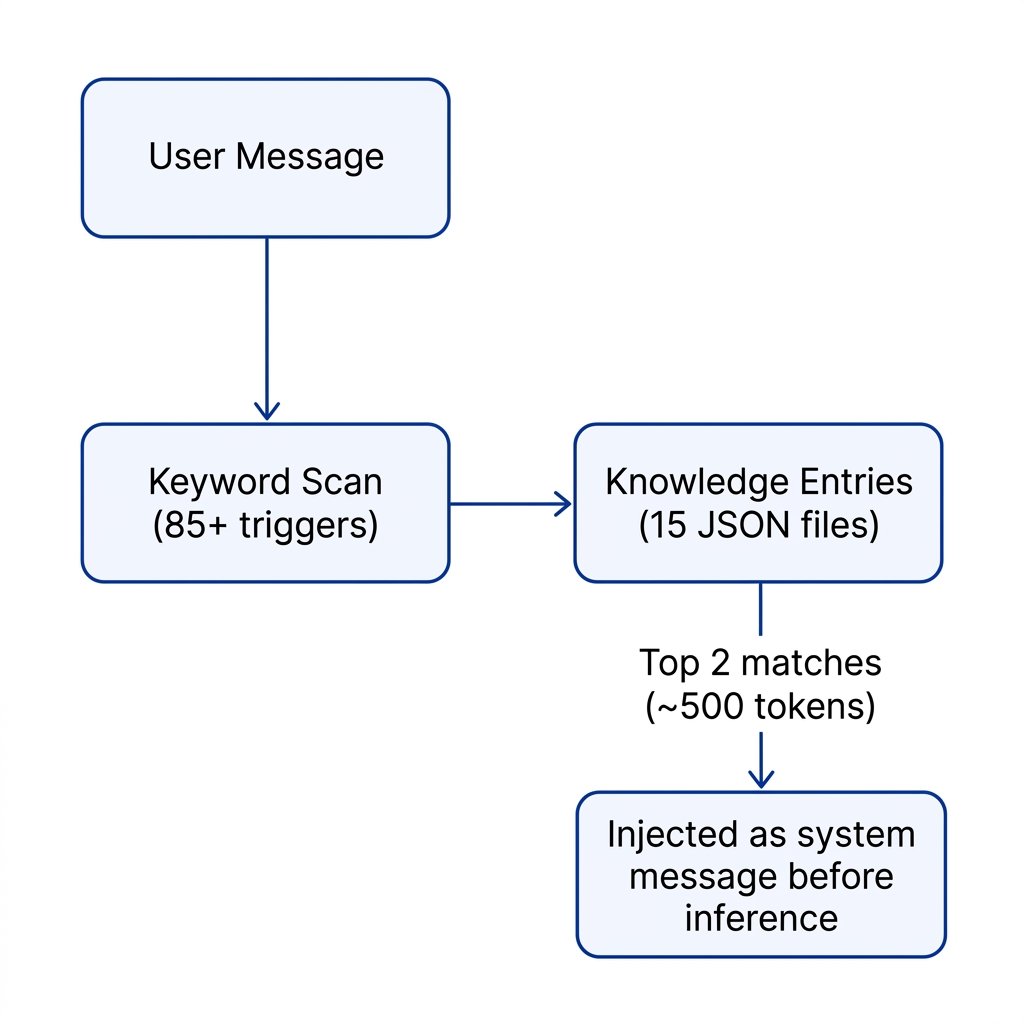
Keywords in the user’s message trigger context injection automatically, before the model sees the message. Zero latency.
Explicit search
The model can call the
knowledge_search tool directly to query the knowledge base on demand.Auto-injection
ThegetContextForMessage() function runs on every request:
- Scans the user’s message against 85+ keyword triggers built from each project’s
keywordsarray andname - Scores matches by keyword hit count
- Injects the top 2 project summaries (~500 tokens) as a system message
Keyword matching rules
Injected format
Explicit search
The model can also callknowledge_search directly when it needs structured information. This uses a weighted scoring system:
Returns up to 5 results, each with name, category, summary, details, token, and website.
If called with an empty query, it returns all entries (name, category, and summary only) — useful for browsing.
Knowledge entries
Each entry is a JSON file ingateway/src/knowledge/. The gateway loads all entries at startup.
Entry schema
Current entries
The knowledge base ships with 15 curated entries:Adding a new entry
Create a JSON file ingateway/src/knowledge/ following the schema above. The gateway loads all .json files from this directory at startup — no code changes required, just restart the server.